SitecoreAI: Add Custom Headers to Forms Webhooks

Integrating Sitecore Forms with external applications has become much easier.
In the latest SitecoreAI update, Sitecore introduced support for custom HTTP headers in Forms webhooks. While it may seem like a small addition, it solves a problem that many developers run into when connecting Sitecore Forms with enterprise APIs and third-party services.
If you've ever had to build a middleware or Azure Function just to add a couple of headers before sending a request, this feature is for you.
⚠️ The Challenge Before This Update
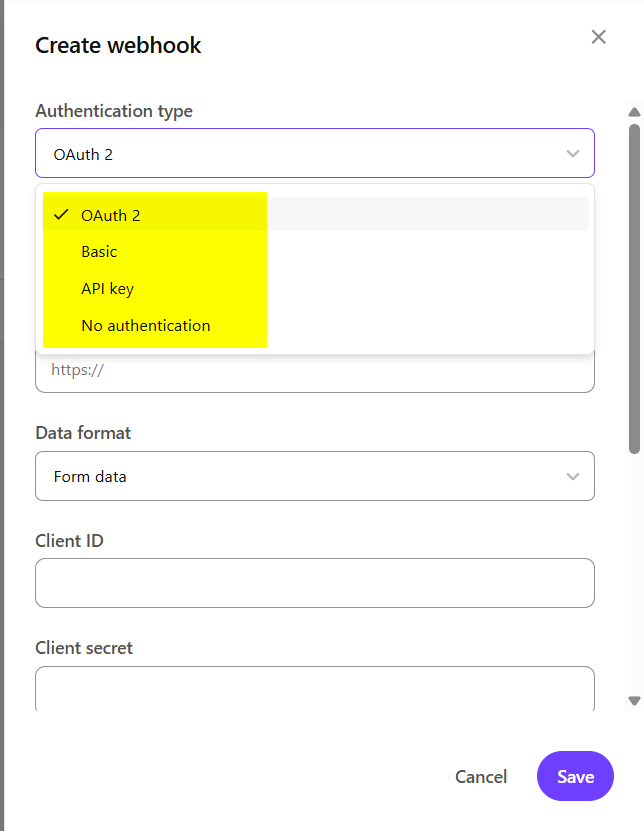
Sitecore Forms already supported multiple authentication methods like:
- Basic Authentication
- OAuth 2
- API Key Authentication
- No Authentication
These options covered authentication well, but many APIs expect more than just authentication.
For example, an API might require headers such as:
X-Request-Id: 666-666-666
X-Correlation-Id: 123-456-789
X-API-Key: PROD
Without these headers, the API would reject the request.
The common workaround was to send the webhook to a middleware service first, where developers would add the required headers before forwarding the request to the actual API.
The architecture usually looked something like this:
Sitecore Form
      │
      ▼
Azure Function / Middleware
      │
      ▼
Target API
While this worked, it also meant:
- More code to maintain
- Additional infrastructure
- Higher deployment complexity
- Extra cost for hosting middleware
✨ What's New?
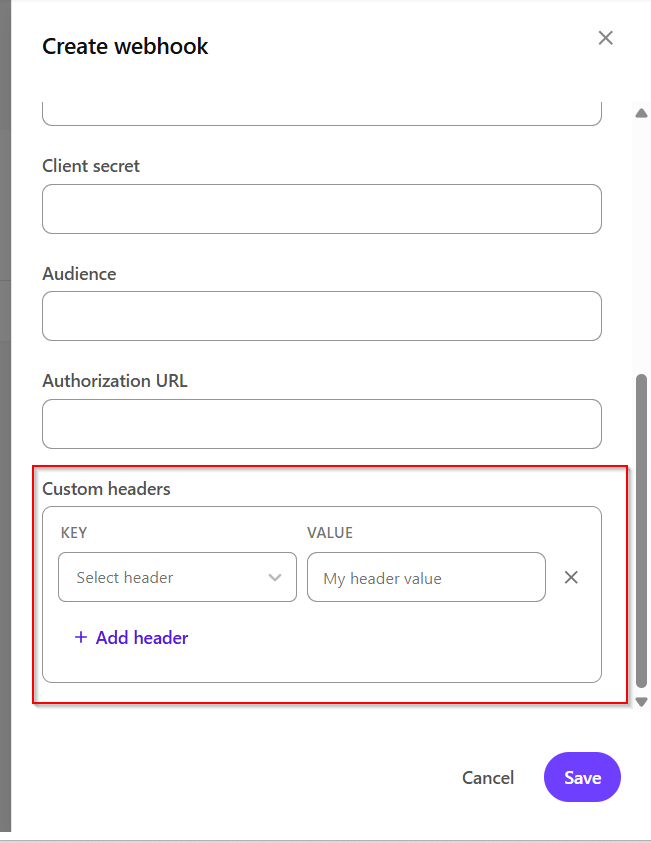
With this update, Sitecore now lets you configure custom HTTP headers directly within the Forms webhook settings.
Whenever a form is submitted, those headers are automatically included in the outgoing request.
This means you can now send requests exactly the way your target API expects - without writing any additional code.
🎯 Why This Is Useful
Simpler Integrations: Many enterprise applications require custom headers to identify the application, environment, tenant, or API version.
Instead of creating a proxy service, you can now configure everything directly inside Sitecore.
🔐 Works with Existing Authentication
Custom headers work alongside the authentication options that were already available.
Whether you're using:
- Basic Authentication
- OAuth 2
- API Keys
- No Authentication
You can still include any additional headers your API requires.
🏷️ Supports Multiple Headers
You're not limited to a single custom header.
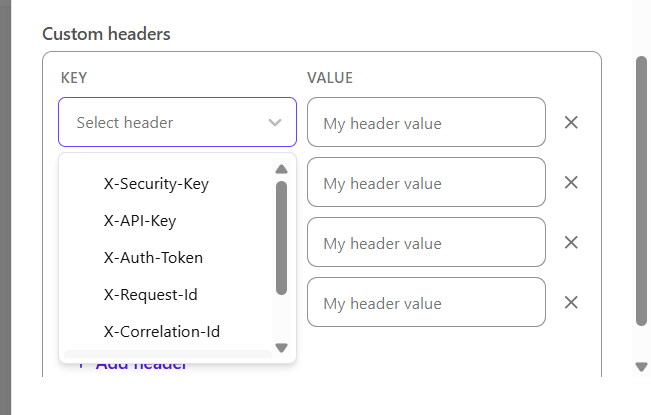
For example:
X-Request-Id: 666-666-666
X-Correlation-Id: 123-456-789
X-API-Key: PROD
This gives you the flexibility to integrate with almost any REST API.
💼 Real-World Examples
Here are a few scenarios where this feature can save time.
☁️ Salesforce Integrations
Some Salesforce endpoints require additional headers to identify environments or business units.
Instead of routing requests through middleware, you can now send those headers directly from Sitecore.
🌐 Azure API Management
If your APIs are protected using Azure API Management, they may expect headers like:
- Subscription keys
- Client identifiers
- Environment names
These can now be configured without any custom development.
🏢 Internal Enterprise APIs
Many organizations expose internal APIs through gateways that validate custom headers before processing requests.
Examples include:
- Department identifiers
- Tenant IDs
- Region names
- Application names
These requirements can now be handled directly from the webhook configuration.
📊 Request Tracking
Some organizations include tracing headers to help monitor requests across multiple systems.
Examples include:
X-Correlation-ID
X-Request-ID
These headers make it easier to troubleshoot issues and trace requests throughout your application landscape.
📨 Example Request
After configuring custom headers, your webhook request could look like this:
POST https://api.company.com/contact

X-Auth-Token: ********
X-Correlation-ID: ********
X-Request-ID: ********
The receiving API gets everything it needs in a single request.
👨💻 What This Means for Developers
For developers, this update removes one of the small but recurring pain points when integrating Sitecore Forms.
Instead of building and maintaining an additional service just to modify HTTP headers, everything can now be configured from within Sitecore.
The new flow becomes much cleaner:
Sitecore Form
      │
      ▼
Target API
Less code. Less infrastructure. Less maintenance.
Sometimes, the smallest features have the biggest impact on day-to-day development.
📝 Final Thoughts
Custom HTTP headers for Forms webhooks might not be the biggest feature announced by SitecoreAI, but it's certainly one of the most practical.
It removes unnecessary complexity from integrations and allows developers to connect Sitecore Forms with a wider range of APIs without writing extra code or deploying middleware.
If you're building integrations with CRMs, marketing platforms, payment gateways, or internal enterprise services, this update will make your implementation simpler and easier to maintain.
Sometimes, it's the quality-of-life improvements like these that save the most development time.